Useful Keyboard Commands
To view hidden files and folders:
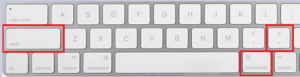
Press and hold the shift, command, and period keys to view hidden files and folders
or type the following command in Terminal:
defaults write com.apple.finder AppleShowAllFiles YES
Note: If hidden files and folders cannot be seen after using the command listed above, reboot the computer.
Key combinations for an Intel-based Mac
Command (⌘)-R: start up from the built-in macOS Recovery system. Or use Option-Command-R or Shift-Option-Command-R to start up from macOS Recovery over the internet. macOS Recovery will install different versions of macOS, depending on the key combination you use.
Option (⌥) or Alt: start up to Startup Manager, which allows you to choose other available startup disks or volumes.
Option-Command-P-R: reset NVRAM or PRAM.
Shift (⇧): start up in safe mode.
D: start up to the Apple Diagnostics utility. Or use Option-D to start up to this utility over the internet.